SNMP v1/v2c/v3 & NUT
Supports SNMP v1, v2c and v3 (APC PowerNet, Eaton, RFC 1628) as well as the NUT TCP protocol (port 3493). Configurable poll intervals and shutdown thresholds for battery charge and runtime.
UPS Hyper-V Shutdown Monitor monitors your UPS via SNMP v1/v2c/v3 or NUT and gracefully shuts down all Hyper-V hosts with all virtual machines on power outage — before the battery runs out.
From UPS monitoring via SNMP or NUT to fully automated Hyper-V shutdown or live migration to a healthy partner host — completely automated end to end.
Supports SNMP v1, v2c and v3 (APC PowerNet, Eaton, RFC 1628) as well as the NUT TCP protocol (port 3493). Configurable poll intervals and shutdown thresholds for battery charge and runtime.
Connects via WinRM / PowerShell Remoting to any number of Hyper-V hosts. Shuts down or suspends VMs (Save-VM) — configurable per VM, in configurable order.
In a 2-node failover setup, the software immediately checks whether an assigned partner host is still on mains power and live-migrates running VMs (Move-VM) to it instead of shutting them down. The now-empty host then shuts itself down. If the partner is also affected, the entire environment shuts down cleanly instead. Pro feature.
Installable as a Windows Service with autostart. Runs 24/7 unattended in the background — even without a logged-in user, ideal for server operation.
Email (SMTP, Microsoft 365), Microsoft Teams (Graph API), SMS (seven.io) and SNMP Trap. Configurable triggers for power outage, low battery, shutdown start and power restored.
Built-in updater compares versions and updates all components from a UNC network path or HTTP server — with one click, including service restart.
Automatic uptime analysis with battery event log and charts. Energy consumption estimate (kWh/day) based on load data — exportable as CSV per time period.
Activate once, use forever. No monthly or annual fees — the license runs indefinitely. A simple activation by e-mail is all it takes. No subscription trap, no recurring charges.
All passwords are encrypted with Windows DPAPI. SNMP v3 with SHA/AES. WinRM optionally with SSL/TLS (port 5986). Single-instance protection via mutex.
Complete user interface in German and English. Language switcher in the title bar — all texts switch instantly at runtime, no restart required. Language preference is saved.
The dashboard shows all important UPS metrics in real time and gives an instant overview of the state of all Hyper-V hosts.
Whether APC, Eaton or any other manufacturer — all relevant values are read via SNMP or NUT.
VMs are stopped via PowerShell Remoting (WinRM) in configurable order — choose Shutdown or Suspend per VM.
| NAME | HOSTNAME / IP | VMs | SSL | ORDER | STATUS |
|---|---|---|---|---|---|
| HV-NODE-01 | 192.168.1.10 | 8 | — | 1 | ✓ Connected |
| HV-NODE-02 | 192.168.1.11 | 5 | ✓ | 2 | ✓ Connected |
| HV-BACKUP | 192.168.1.20 | 2 | — | 3 | ○ Disconnected |
| VM NAME | STATUS | RAM | ACTION |
|---|---|---|---|
| VM01-DC | Running | 4 GB | ⏹ Shutdown |
| VM02-FILE | Running | 8 GB | ⏹ Shutdown |
| VM03-APP | Running | 16 GB | ⏸ Suspend |
| VM04-SQL | Running | 32 GB | ⏹ Shutdown |
Multiple notification channels in parallel — each independently activatable, all channels fire simultaneously.
Teams Graph API requires an Azure App Registration with ChannelMessage.Send permission — no legacy webhook needed.
The integrated Windows Service takes over UPS monitoring fully automatically — installable directly from the GUI, no sc.exe required.
All events are displayed in real time and permanently saved in rotating log files.
The included updater compares versions and updates all three components (GUI, Service, Updater) with one click.
Update deployment: simply copy version.json + EXE files to a network share or web server — all clients update with one click.
The complete user interface is fully available in German and English. All labels, dialogs, status texts and messages switch instantly — no restart, no reinstall needed.
DE / EN directly in the title barDynamicResource binding — language switch without restartPerfect for international teams and mixed environments — every user works in their preferred language.
Industrial dark theme, live UPS status and Pro reports straight from the application.
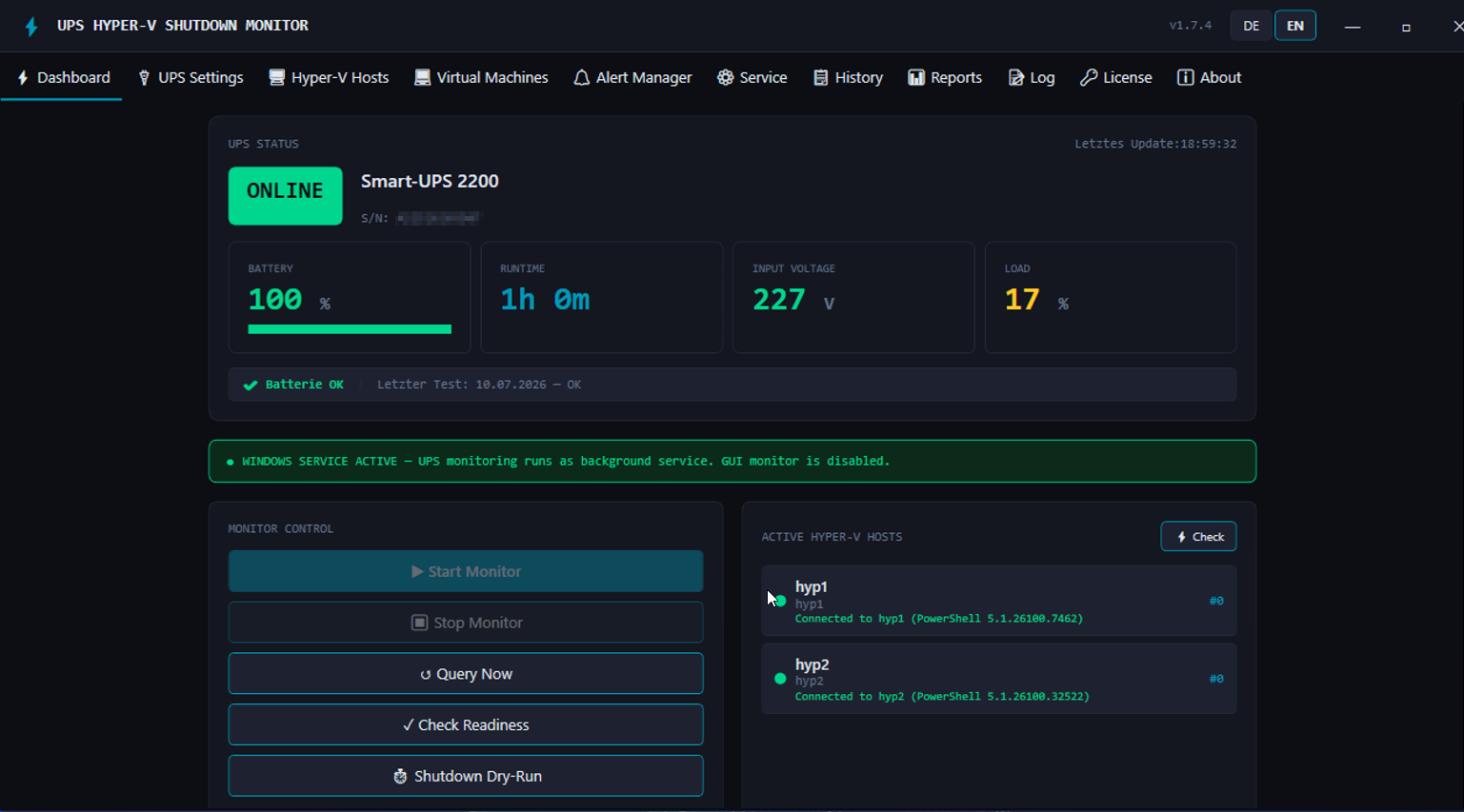
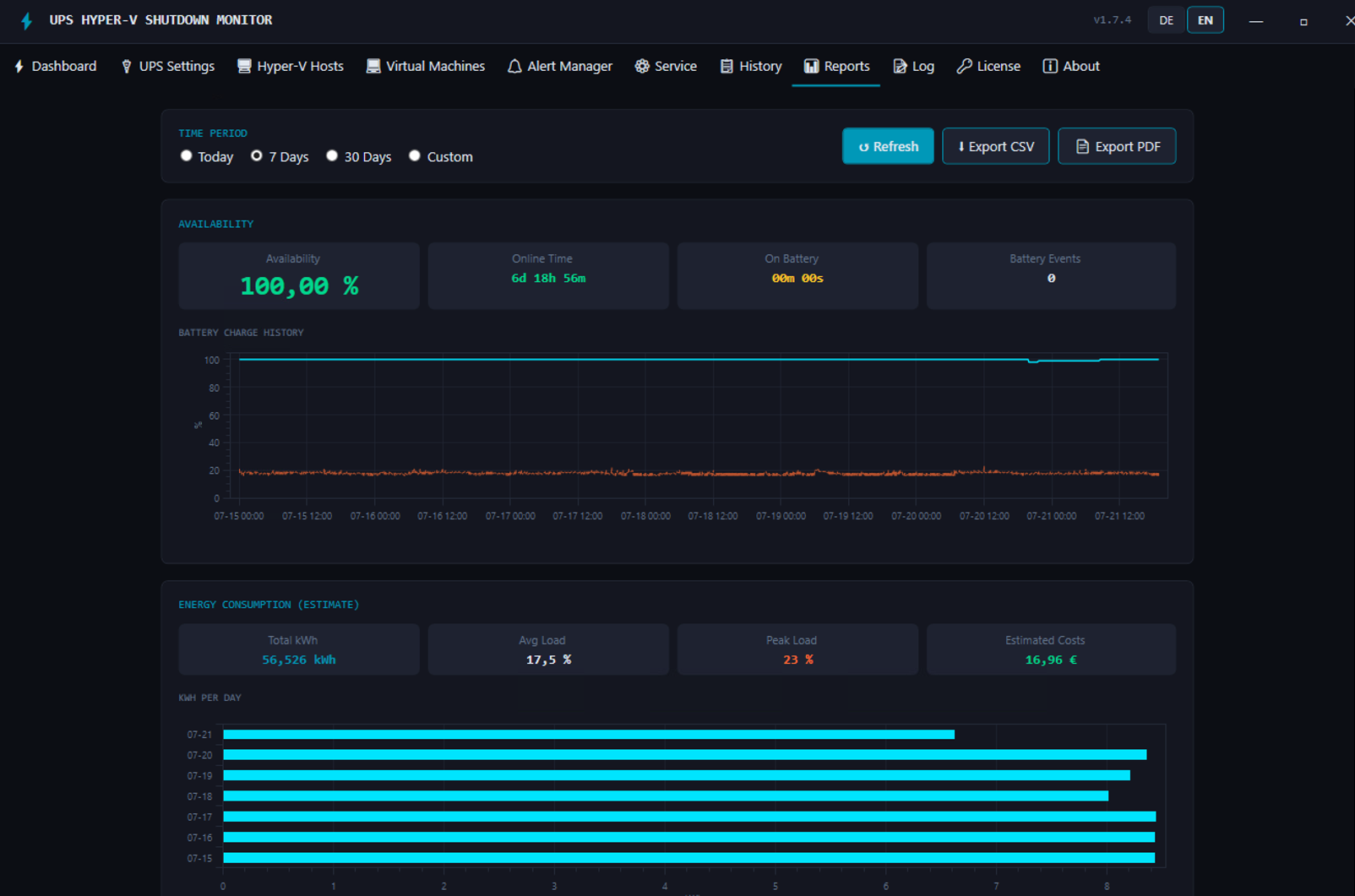
Everything important about the UPS Hyper-V Shutdown Monitor at a glance.
The UPS Hyper-V Shutdown Monitor supports all UPS manufacturers that speak SNMP v1, v2c or v3 — including APC (American Power Conversion) with the PowerNet MIB, Eaton with manufacturer-specific OIDs, and all devices that implement the IETF standard RFC 1628 (UPS-MIB). Additionally, the NUT protocol (Network UPS Tools) via TCP port 3493 is supported, which is used by many other manufacturers.
As soon as the UPS switches to battery operation, the tool monitors configurable thresholds (battery charge in percent and/or runtime in seconds). After a configurable number of consecutive confirmation polls (anti-false-trigger), the shutdown process is triggered: All Hyper-V hosts are processed in the defined order — for each host, all running VMs are processed first. Depending on the per-VM configuration, either Stop-VM (graceful shutdown — OS shuts down normally) or Save-VM (suspend/hibernate — RAM is saved to disk, immediate halt without OS shutdown). The host itself is then shut down via shutdown.exe. All configured alert channels are notified immediately when the outage is detected.
On the Hyper-V host, Enable-PSRemoting -Force must be run once as administrator. If the tool runs on a different machine or in a workgroup, the host must be added as a TrustedHost: Set-Item WSMan:\localhost\Client\TrustedHosts -Value '192.168.1.10' -Force. The configured user requires membership in the "Hyper-V Administrators" group. A complete step-by-step guide is included in the app's FAQ window.
Email (SMTP): Enter server, port, TLS/SSL, username and password in the app — done.
Email (Microsoft 365 App-only): Azure app registration with application permission Mail.Send in Microsoft Graph, admin consent and a client secret. Enter Tenant ID, Client ID and Secret in the app. Ideal for Windows Service operation without a logged-in user.
Microsoft Teams (PRO): Azure app registration with application permission ChannelMessage.Send — no interactive user needed. Enter Team ID, Channel ID, Tenant ID, Client ID and Client Secret.
SMS via seven.io (PRO): Create an API key at seven.io and enter recipient number(s) in E.164 format.
Every channel has a Test button directly in the app. Detailed setup guides are available in the in-app FAQ under "Notifications".
Yes. The UPS Hyper-V Shutdown Monitor requires no internet connection for core operation. UPS communication takes place in the local network via SNMP or NUT, the Hyper-V connection via WinRM is also local. Only optional features such as Microsoft 365 email, Microsoft Teams, SMS (seven.io) or the software updater (when configured with an HTTP URL) require an outbound network connection.
The Standard license includes the complete core feature set: UPS monitoring (SNMP v1/v2c/v3 + NUT), automatic Hyper-V emergency shutdown with any number of hosts and VMs, email alerts (SMTP + Microsoft 365), SNMP Trap, Windows Service operation and the automatic software updater.
The Pro license additionally includes: multiple UPS devices (assign each Hyper-V host to a specific UPS — if one UPS fails, only its hosts shut down), live migration of running VMs to a healthy partner host instead of shutting them down, Microsoft Teams alerts (Graph API), SMS alerts via seven.io, Availability Reports (interactive charts, battery charge history with real measurement data, battery event log), Energy Consumption Analysis (kWh estimation, load data, electricity cost calculation €/kWh), CSV and PDF export of reports, and the monthly manager report (automatic PDF sent via email, configurable day and time, includes UPS model and serial number). All PRO features are fully unlocked during the 30-day trial.
Yes, any number of Hyper-V hosts can be configured. Each host has its own connection configuration (IP, port, user, SSL) and a freely definable shutdown order. Hosts with a lower order number are shut down first. The shutdown process waits for each host to complete before starting the next one.
With two Hyper-V hosts on separate UPS devices (e.g. two sites or two racks), the software immediately checks whether the other node is still on mains power when an outage starts. If the partner is healthy, the affected host's running VMs are moved to it via live migration (Move-VM) — the now-empty host is then cleanly shut down itself once its own UPS runtime is exhausted. If the partner node is also affected (a combined outage at both sites), the software does not migrate — instead, once the configured runtime threshold is reached, it shuts down the entire environment: both Hyper-V hosts plus any assigned physical servers (Windows servers without the Hyper-V role, via WinRM). Live migration is a Pro feature and requires either a failover cluster with shared storage or correctly configured shared-nothing migration.
After installation, the UPS Hyper-V Shutdown Monitor automatically starts as a 30-day fully functional trial — all features are unlocked, no registration or credit card required. After 30 days, UPS monitoring and emergency shutdown are blocked until a license is activated. Buy the license directly online — one-time payment, instant activation via key in the app.
No subscription, no vendor lock-in, no per-server licensing — one tool for all your hosts.
| FEATURE |
⚡ UPS Monitor
247-IT
|
APC PowerChute
PCNS
|
Eaton IPM
Intelligent Power Manager
|
NUT
Network UPS Tools
|
|---|---|---|---|---|
| LICENSING & COSTS | ||||
| License model | One-time purchase | Subscription / Renewal | Subscription / Renewal | Open Source |
| License for multiple Hyper-V hosts |
✓ One license unlimited hosts |
Per server node license × number of hosts |
Per agent agent required on each host |
✓ free |
| Ongoing costs | None | Annual | Annual | None |
| HYPER-V & WINDOWS | ||||
| Native Hyper-V integration | ✓ | ✓ limited |
✓ agent required |
— Linux scripts |
| VM Shutdown and Suspend (Save-VM) | ✓ | — | — | — |
| Windows GUI with dark-theme dashboard | ✓ | ✓ | ✓ web UI |
— CLI only |
| Windows service (no logged-in user needed) | ✓ | ✓ | ✓ | — |
| UPS COMPATIBILITY | ||||
| Supported UPS brands | All SNMP + NUT → 100+ brands |
APC only | Mainly Eaton | All NUT drivers |
| SNMP v3 (SHA + AES) | ✓ | ✓ | ✓ | ✓ |
| ALERTING & REPORTS | ||||
| Microsoft Teams & SMS alerts | PRO ✓ | — | — | — |
| Availability reports & energy analysis | PRO ✓ | — | ✓ with subscription |
— |
| Monthly manager report (PDF via email) | PRO ✓ | — | — | — |
| Multiple UPS devices with host assignment (each UPS its own hosts) | PRO ✓ | — | — | — |
| Multilingual (DE / EN) | ✓ | — EN only |
✓ | — |
Try all features free for 30 days — no credit card, no subscription, ready to use immediately.
⬇ Try Free — 30 DaysBoth editions include all core features — Pro adds advanced analysis capabilities.
| FEATURE | STANDARD | PRO ★ |
|---|---|---|
| UPS MONITORING | ||
| SNMP v1 / v2c / v3 (APC, Eaton, RFC 1628) | ✓ | ✓ |
| NUT TCP protocol | ✓ | ✓ |
| Configurable thresholds & polling interval | ✓ | ✓ |
| HYPER-V INTEGRATION | ||
| Unlimited Hyper-V hosts | ✓ | ✓ |
| Graceful VM shutdown + host shutdown via WinRM | ✓ | ✓ |
| Configurable shutdown order | ✓ | ✓ |
| Include additional physical servers in the emergency shutdown | ✓ | ✓ |
| Live migration of running VMs to a healthy partner host (instead of shutdown) | — | ✓ |
| ALERTING | ||
| E-mail (SMTP / Microsoft 365 OAuth2) | ✓ | ✓ |
| OPERATION | ||
| Windows service & auto-start | ✓ | ✓ |
| WPF dashboard & live status | ✓ | ✓ |
| Test mode (no real shutdown commands) | ✓ | ✓ |
| Automatic updates | ✓ | ✓ |
| ADVANCED ALERTING & ANALYSIS — PRO ONLY | ||
| Microsoft Teams (Graph API) | — | ✓ |
| SMS (seven.io Gateway) | — | ✓ |
| Availability reports Uptime percentage, battery event log, history chart | — | ✓ |
| Energy consumption analysis kWh estimate, daily breakdown, bar chart | — | ✓ |
| CSV & PDF export of reports | — | ✓ |
| Electricity cost calculation Configurable €/kWh rate, estimated cost per day and total | — | ✓ |
| Monthly manager report Automatic PDF sent via email — scheduled monthly, includes UPS model & serial number | — | ✓ |
| Multiple UPS devices Assign each Hyper-V host to a specific UPS — if one UPS fails, only its hosts shut down | — (1 UPS) | ✓ |
|
€ 139
Buy License
|
€ 199
Buy License
|
|
Fully functional trial — all features unlocked, no credit card, no commitment. After 30 days, UPS monitoring and emergency shutdown are fully blocked until a license is activated.